Class CurveLabel
Curve labels can be added with WCartesianChart#addCurveLabel(). They are associated with a particular series, and are drawn at
the given point in model coordinates. When the chart is transformed (zoom or pan) or the
associated series is manipulated, the curve label's position will change, but not its size.
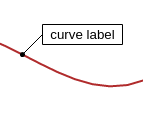
A curve label
-
Constructor Summary
ConstructorsConstructorDescriptionCurveLabel(WDataSeries series, WPointF point, String label) Create a new curve label.CurveLabel(WDataSeries series, Object x, Object y, String label) Create a new curve label. -
Method Summary
Modifier and TypeMethodDescriptionGet the brush to use for the box around the text.getLabel()Get the label that should be drawn in the box.Get the pen to use for the connecting line.Get the brush used to fill the circle atgetPoint().Get the offset the text should be placed at.getPoint()Get the point in model coordinates this label is associated with.Get the series this curve label is associated with.Get the pen for the text in the box.intgetWidth()Get the width of the box in pixels.getX()Get the x position for this label.getY()Get the y position for this label.voidvoidsetBoxBrush(WBrush brush) Set the brush to use for the box around the text.voidSet the label that should be drawn in the box.voidsetLinePen(WPen pen) Set the pen to use for the connecting line.voidsetMarkerBrush(WBrush brush) Set the brush used to fill the circle atgetPoint().voidSet the offset the text should be placed at.voidSet the point in model coordinates this label is associated with.voidSet the point in model coordinates this label is associated with.voidsetSeries(WDataSeries series) Set the series this curve label is associated with.voidsetTextPen(WPen pen) Set the pen for the text in the box.voidsetWidth(int width) Set the width of the box in pixels.
-
Constructor Details
-
CurveLabel
Create a new curve label.Create a new curve label for given series, at the given point with the given text.
-
CurveLabel
Create a new curve label.Create a new curve label for given series, at the given x, y coordinates and the given text.
-
-
Method Details
-
setSeries
Set the series this curve label is associated with. -
getSeries
Get the series this curve label is associated with.- See Also:
-
setPoint
Set the point in model coordinates this label is associated with. -
setPoint
Set the point in model coordinates this label is associated with. -
getPoint
Get the point in model coordinates this label is associated with.Note: This uses asNumber(), which may not be the same conversion that
WCartesianChart#mapToDevice()uses, depending on the scale of the axis.getX()andgetY()will perform no conversion, so they may be safer to use.- See Also:
-
getX
Get the x position for this label.- See Also:
-
getY
Get the y position for this label.- See Also:
-
setLabel
Set the label that should be drawn in the box. -
getLabel
Get the label that should be drawn in the box.- See Also:
-
setOffset
Set the offset the text should be placed at.The offset is defined in pixels, with x values going from left to right, and y values from top to bottom.
The default offset is (60, -20), which means the middle of the
getLabel()is drawn 60 pixels to the right, and 20 pixels above the point. -
getOffset
Get the offset the text should be placed at.- See Also:
-
setWidth
public void setWidth(int width) Set the width of the box in pixels.If the width is 0 (the default), server side font metrics will be used to determine the size of the box.
-
getWidth
public int getWidth()Get the width of the box in pixels.- See Also:
-
setLinePen
Set the pen to use for the connecting line.This sets the pen to use for the line connecting the
getPoint()to the box with thegetLabel()atgetOffset()pixels from the point. -
getLinePen
Get the pen to use for the connecting line.- See Also:
-
setTextPen
Set the pen for the text in the box. -
getTextPen
Get the pen for the text in the box.- See Also:
-
setBoxBrush
Set the brush to use for the box around the text.This sets the brush used to fill the box with the text defined in
getLabel(). -
getBoxBrush
Get the brush to use for the box around the text.- See Also:
-
setMarkerBrush
Set the brush used to fill the circle atgetPoint(). -
getMarkerBrush
Get the brush used to fill the circle atgetPoint().- See Also:
-
render
-